
mda_damico
New member
- Messages
- 10
This extension enhances your on-camera appearance and adjusts video image, making it perfect for professional meetings, video chats, and live streams. It is fully compatible with any website that supports video conferencing or streaming, including Zoom, Google Meet, Microsoft Teams, Skype, Discord, and many more.
Using AI technology, it can perfectly detect a face and background to apply effects in real time. The intuitive UI lets you easily adjust the filter intensity to your preference.
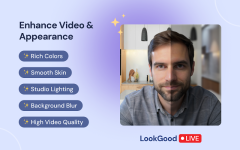
We have combined six features that instantly refine your look and the entire image in any setting:
Chrome web store link:
https://chromewebstore.google.com/detail/mleflnbfifngdmiknggikhfmjjmioofi
Using AI technology, it can perfectly detect a face and background to apply effects in real time. The intuitive UI lets you easily adjust the filter intensity to your preference.
We have combined six features that instantly refine your look and the entire image in any setting:
- Smooth Skin: softens wrinkles, blemishes, and other skin imperfections.
- Color Correction: enriches colors to produce a vivid, eye-catching video.
- Light Correction: enhances lighting to brighten your video, even in dark or low-light settings.
- Video Sharpening: sharpens the image for improved clarity and detail.
- Portrait Lighting: adds light to the portrait area and subtly darkens the background to create depth.
- Background Blur: blur the background for hiding unnecessary details.
Chrome web store link:
https://chromewebstore.google.com/detail/mleflnbfifngdmiknggikhfmjjmioofi
