
Hi everyone,
Most of us only have a standard A4 or Letter printer at home or in the office. Whenever you want to print a massive image, a custom room poster, or a temporary banner for an event, standard software usually messes up the alignment or pixelates the image.
I built this tool to do exactly one job well: it takes any image you upload, slices it into multiple pages based on your custom layout, and lets you print them out using a regular printer to piece together a giant poster.
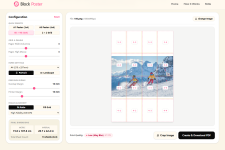
Key features implemented:
1. Custom Slicing: You can choose how many pages wide/tall you want the final poster to be.
2. Orientation Support: Easily switch between Landscape and Portrait to fit the original image's aspect ratio.
3. Overlap Margins: Slices include cut lines and margins so you can align and tape the sheets together perfectly.
4. One-Click PDF: It renders everything into a single multi-page PDF for effortless printing.
It’s completely free, runs entirely in the browser, and there are no aggressive ads or paywalls blocking the core utility.
I’m really trying to keep it a pure, single-purpose tool without unnecessary bloat. If you have a regular printer and want to make something big on a budget, I'd love for you to try it out:Block Poster
Any feedback on the rendering speed, UI layout, or features you'd like to see added would be greatly appreciated. Thanks for checking it out!
Most of us only have a standard A4 or Letter printer at home or in the office. Whenever you want to print a massive image, a custom room poster, or a temporary banner for an event, standard software usually messes up the alignment or pixelates the image.
I built this tool to do exactly one job well: it takes any image you upload, slices it into multiple pages based on your custom layout, and lets you print them out using a regular printer to piece together a giant poster.
Key features implemented:
1. Custom Slicing: You can choose how many pages wide/tall you want the final poster to be.
2. Orientation Support: Easily switch between Landscape and Portrait to fit the original image's aspect ratio.
3. Overlap Margins: Slices include cut lines and margins so you can align and tape the sheets together perfectly.
4. One-Click PDF: It renders everything into a single multi-page PDF for effortless printing.
It’s completely free, runs entirely in the browser, and there are no aggressive ads or paywalls blocking the core utility.
I’m really trying to keep it a pure, single-purpose tool without unnecessary bloat. If you have a regular printer and want to make something big on a budget, I'd love for you to try it out:Block Poster
Any feedback on the rendering speed, UI layout, or features you'd like to see added would be greatly appreciated. Thanks for checking it out!